Network Configuration
Overview
RecoveryBox uses a network bridge architecture to manage its interconnections in a versatile way. Each physical interface can be assigned to one of the bridges depending on needs.
Interface management is handled by systemd-networkd.
Diagram
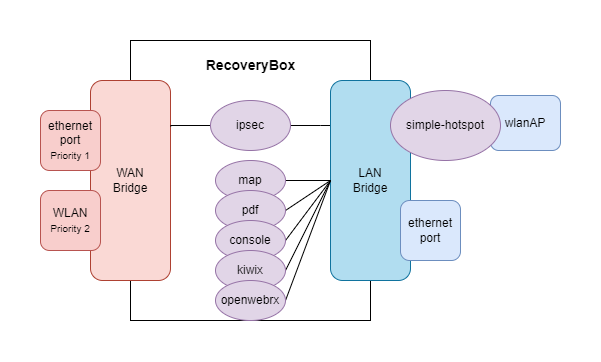
Architecture
Bridges
| Bridge | Role |
|---|---|
| Wan | Groups interfaces connected to the Internet (Ethernet in priority, Wi-Fi as fallback) |
| Lan | Groups local network interfaces (clients, internal services) |
Wi-Fi interface (wlanAP)
The wlanAP interface is linked to the simple-hotspot container, which bridges it to the Lan interface.
WAN priority
Priority is always given to Ethernet interfaces. Even if a Wi-Fi interface on the WAN obtains a route with a gateway, the Ethernet interface takes priority as long as it is active.
iptables Rules
iptables rules are defined in the file /etc/iptables/iptables.sh.
Default rules
| Chain | Rule | Description |
|---|---|---|
| INPUT | All from Lan | Traffic allowed from the local network |
| INPUT | ICMP from Wan | Ping allowed from the Internet |
| INPUT | SSH (port 22) from Wan | SSH connection allowed from the Internet |
| INPUT | Drop from Wan | All other inbound WAN traffic blocked |
| FORWARD | All to Wan | Traffic forwarded to the Internet |
| FORWARD | All to containers | Traffic forwarded to Docker containers |
| NAT | Masquerade on Wan exit | Address translation for Internet access |
Interface management
Managed files
All interface and rule management is performed by the network-configurator script. All files managed by this script are prefixed with the comment Managed by network-configurator. Manual modifications to these files may be overwritten when running network-configurator.